
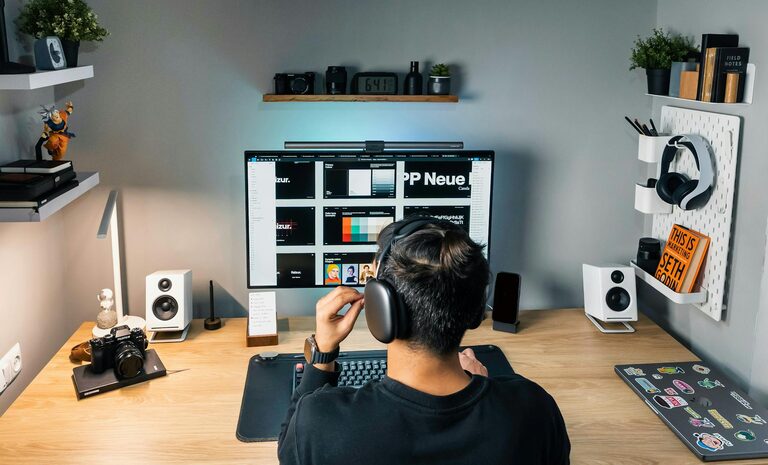
Creating a cozy and functional home office is essential for anyone who works from home or needs a dedicated space for focused tasks. Whether you have a small corner in your living room or a spare room to convert, designing a workspace that balances comfort and practicality can greatly improve your daily productivity and well-being.
In this post, we’ll explore practical tips to help you set up a home office that feels inviting and supports your work habits.
Why a Cozy and Functional Office Matters
When your workspace feels welcoming, it’s easier to stay motivated and avoid burnout. Comfort reduces physical strain, while an organized layout helps minimize distractions. A well-planned office can improve both your mood and efficiency.
Choosing the Right Location
Consider Natural Light
Place your office near a window if possible. Natural light boosts mood and helps reduce eye strain. If natural light is limited, invest in good quality lighting that mimics daylight.
Minimize Noise
Pick a quiet spot away from household noise. Use rugs, curtains, or even noise-canceling headphones to create a peaceful environment.
Furniture: Comfort Meets Functionality
Desk and Chair
Choose a desk size that fits your space but also supports your work needs. A desk with built-in storage or shelves can help keep essentials within reach.
Invest in an ergonomic chair with adjustable features. Sitting comfortably will help you maintain good posture and reduce health issues.
Storage Solutions
Use shelves, filing cabinets, or baskets to keep supplies organized. Clutter-free workspaces boost focus and create a calm atmosphere.
Personalize Your Space
Colors and Decor
Select colors that promote calmness and focus, such as soft blues, greens, or neutral tones. Use artwork, plants, or personal items to make the space uniquely yours.
Plants
Adding greenery improves air quality and brings a touch of nature indoors. Plants can also reduce stress and enhance creativity.
Technology and Organization
Cable Management
Use cable organizers or clips to keep cords tidy and prevent tangling. A clean workspace helps keep your mind clear.
Essential Tech Setup
Ensure your computer, printer, or any other devices are positioned for comfort and convenience. Consider a second monitor or keyboard tray if you need to enhance productivity.
Lighting Tips
Layered Lighting
Combine ambient lighting with task lighting. Use a good desk lamp to reduce eye strain when working late or on detailed tasks.
Avoid Glare
Position screens to avoid reflections from windows or lights, which can cause discomfort and reduce visibility.
Maintain Work-Life Balance
Separate Work and Relaxation
If possible, create physical boundaries between your office and living areas. This will help signal to your brain when it’s time to work and when to unwind.
Schedule Breaks
Incorporate regular breaks to stretch or move around. Use your cozy office space to create a routine that supports mental and physical health.
Final Thoughts
Designing a home office that is both cozy and functional doesn’t have to be complicated. By focusing on lighting, ergonomics, organization, and personalization, you can create a space that supports your work and makes your day more enjoyable. Start small and adjust as you find what works best for you.
Your home office can be a favorite part of your home—comfort and productivity go hand in hand!